How To Maintain A Glass-top Computer Table

Keeping your glass-top computer table clean and scratch-free is easier when you follow a few simple habits that protect the surface every day.
Daily Cleaning Habits for a Clear Surface
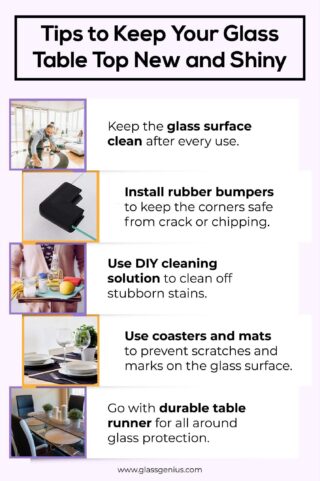
After each work session, spend a minute wiping the glass with a soft, slightly damp microfiber cloth to remove dust and fingerprints before they harden. This quick habit prevents buildup and keeps the transparency sharp without aggressive products. For light smudges, a clean, dry microfiber cloth is often enough, while a mildly damp cloth can handle everyday dirt.
Avoid spraying cleaners directly onto the glass, because excess liquid can seep into the edges and damage the table frame or electronics below. Instead, spray a small amount onto the cloth and then gently pass it over the surface in straight, overlapping strokes. If you use a screen or keyboard cover, remember to clean those accessories too, since debris trapped underneath can scratch the glass when you type or move the mouse.

Handling Spills and Sticky Marks
When coffee, water, or soda spills, act fast by blotting the liquid with a soft, absorbent cloth rather than rubbing, which can spread the stain. After blotting, wipe the area with a cloth dampened with clean water and dry it immediately to avoid water spots. For greasy marks left by food or hand oils, a solution of warm water and a tiny amount of mild dish soap on a cloth usually lifts the residue safely.
Stay away from harsh or abrasive cleaners, including bleach-based products, scouring powders, or rough sponges, because they can etch or dull the glass over time. If you prefer a natural option, a mix of equal parts water and white vinegar on a cloth works well for tougher spots, as long as you rinse and dry the surface afterward. Always test any new cleaner on a small corner first to confirm it does not leave streaks or film on your glass-top computer table.
Protecting Against Scratches and Heat
Place coasters, mats, or felt pads under heavy accessories such as monitors, docking stations, and external drives to prevent dust and grit from grinding into the glass when these items are moved. Encourage a habit of lifting, not dragging, devices across the surface, and consider a single large mouse pad to concentrate movement in one area. For keyboards with sharp feet, a padded wrist rest not only improves comfort but also reduces the risk of tiny scratches.

Hot devices like laptops and power adapters can leave marks or even cause stress cracks, so use heat-resistant pads or a thin ceramic tile under heavy equipment. Keep cables organized with clips or channels so they do not tug on ports and drag across the glass during adjustments. If your table has built-in cable trays, route wires through them to minimize accidental friction against the surface.
Long-Term Maintenance and Environmental Control
Dust and fine particles can settle on the glass between cleanings, so use a dry microfiber cloth or a soft brush along the edges and corners to gently remove loose debris before wiping. Periodically inspect the frame and legs for loose screws or wobbly joints, tightening them carefully to keep the table stable and prevent stress on the glass. If your table includes tempered glass, remember that while it is stronger, it still requires gentle care around the edges where chipping can start.
Control the environment around your workspace by keeping the table away from direct sunlight, which can cause uneven fading or weaken adhesives in some constructions. Maintain moderate humidity to avoid condensation on the glass, and keep decorative items or heavy objects from resting on the surface for long periods. A consistent routine of light daily cleaning, careful handling, and occasional deep care will preserve the clarity and strength of your glass-top computer table for years.
Troubleshooting Common Issues
If you notice white rings left by mugs or keyboards, gently rub them with a cloth dampened with a small amount of baking soda mixed with water, then rinse and dry thoroughly. Sticky residues from labels or tape can be reduced by applying a tiny bit of rubbing alcohol to a cloth, followed by a water wipe and drying. Persistent scratches that affect visibility may require a specialized glass polish or professional service, depending on the depth and your comfort level.
Remember that prevention is always more effective than repair, so stick to soft tools, mild cleaners, and gentle pressure. If your table has an integrated monitor arm or cable system, follow the manufacturer guidance for cleaning and movement so you do not strain the structure. By treating your glass-top computer table with consistent, careful habits, you keep it looking sleek, functional, and ready for productive days.
Establishing a Simple Care Routine
Create a short checklist that fits your workflow, such as a quick wipe at the end of each day, a deeper clean once a week, and a monthly check of supports and accessories. Place a small spray bottle and microfiber cloth near your desk so you can respond immediately to spills without searching across the room. Over time, these small actions become automatic and significantly extend the life and appearance of your glass-top computer table.

In the end, maintaining a glass-top computer table is about balance: using effective but gentle cleaning methods, protecting the surface from everyday hazards, and adjusting your habits to suit the material. With steady, mindful care, the glass stays clear, reflections remain crisp, and your workspace continues to feel modern, organized, and inspiring.
How to Clean a Glass Table
Learn how to clean a glass table with this guide from wikiHow: https://www.wikihow.com/Clean-a-Glass-Table Follow our social ...
